
Download VirtuaScore Basketball – free Mac basketball simulation, educational tool
Overview of VirtuaScore Basketball
VirtuaScore Basketball is a full‑version Mac application that blends the excitement of a basketball‑style scoring game with genuine educational value. Positioned in the Science & Education category under the quirky “Funny Things” sub‑category, the program offers a playful way for students, teachers, and casual gamers alike to explore basic physics, statistics, and strategic thinking—all while enjoying a fast‑paced virtual basketball experience. First added to our catalog in 2016, VirtuaScore Basketball has seen steady interest, reaching three downloads in its early years and adding a fresh download last week, proving that niche educational tools still attract a dedicated audience.
The current release, version 1.2, was last updated on 1 February 2017. Although the install size is not publicly listed, the application runs smoothly on any Mac OS X system and newer versions, delivering a responsive UI that feels native to macOS. The software is distributed in English and is designed to be completely free of hidden fees, making it an ideal choice for schools with limited budgets or families looking for a secure, ad‑free educational game.
From a pedagogical perspective, VirtuaScore Basketball serves as a sandbox for experimenting with concepts such as projectile motion, momentum, and probability. By letting users adjust variables like shot angle, power, and player skill, the program demonstrates how subtle changes can dramatically affect outcomes—an approach that mirrors real‑world scientific inquiry. In short, this app is more than just a game; it’s a hands‑on learning platform that encourages curiosity while delivering the thrill of scoring a buzzer‑beater.
Key Features and Core Functionality
- Real‑time scoring engine: Calculates points instantly, reflecting realistic basketball rules and providing immediate feedback.
- Physics‑driven shot mechanics: Uses basic Newtonian physics to simulate ball trajectory, allowing users to experiment with angle, force, and spin.
- Statistical dashboards: Tracks shot percentages, player efficiency, and game trends, turning raw data into easy‑to‑read charts.
- Customizable difficulty levels: From “Beginner” for classroom demos to “Expert” for seasoned gamers, the difficulty adapts to the user’s skill set.
- Educational modules: Built‑in lessons on probability, force vectors, and data analysis that can be toggled on or off.
- Multilingual support (future‑ready): Although currently English‑only, the codebase is structured for easy localization.
- Secure, offline operation: No internet connection required, ensuring a safe environment for younger users.
- Exportable results: Users can save game logs as CSV files for further analysis or classroom reporting.
Each feature is designed with both fun and learning in mind. For example, the statistical dashboards not only display who made the most three‑pointers but also break down the underlying success rates, prompting discussions about sample size and variance. The customizable difficulty ensures that teachers can align the game’s challenge with curriculum goals, while the offline operation guarantees that the software complies with school network policies and parental concerns about data privacy.
Moreover, VirtuaScore Basketball’s user interface follows macOS Human Interface Guidelines, offering a clean, intuitive layout with drag‑and‑drop controls for setting shot parameters. The color scheme is bright yet not overwhelming, making it suitable for both younger students and adult learners. Overall, the feature set positions the app as a versatile tool that can be used in physical education classes, mathematics lessons, or simply as a recreational pastime on a family Mac.
Installation, Usage, and Compatibility
Step‑by‑Step Installation Guide
- Visit the official download page and click the “Download for macOS” button. The file is a standard
.dmgpackage. - Once the download completes, double‑click the
.dmgfile to mount the virtual disk. - Drag the VirtuaScore Basketball icon into your Applications folder. macOS may prompt you to confirm the action—click “Copy”.
- Eject the virtual disk by right‑clicking its icon on the desktop and selecting “Eject”.
- Open the Applications folder and double‑click VirtuaScore Basketball to launch the program.
The first launch may trigger a security warning because the app is not from the App Store. To bypass this, go to System Preferences → Security & Privacy → General and click “Open Anyway”. This step is a one‑time action; subsequent launches will start without prompts.
How to Use the Application Effectively
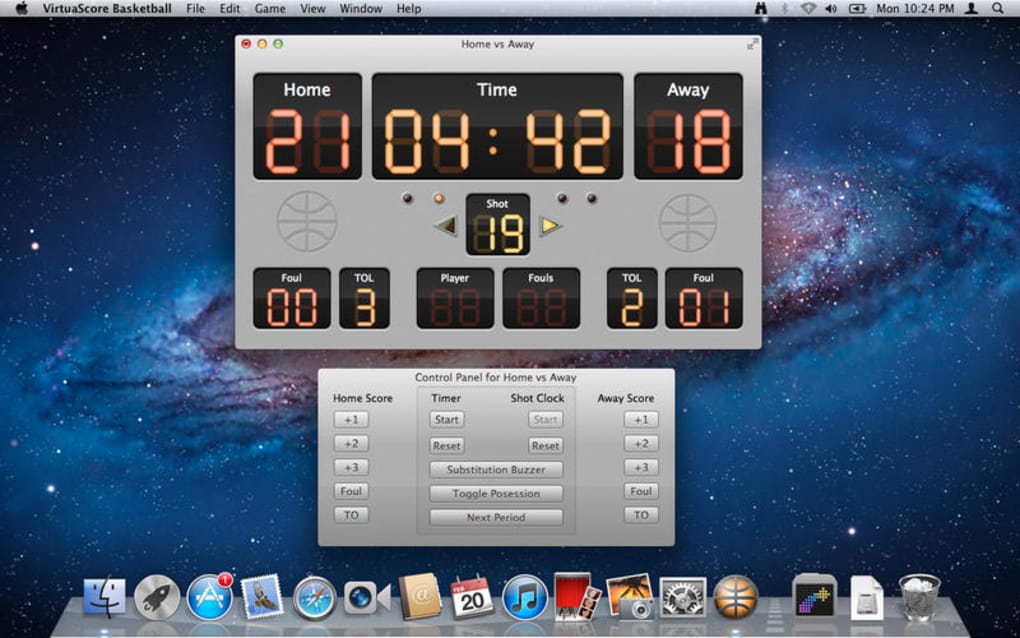
Upon opening the app, you’ll be greeted by a dashboard that offers two primary modes: Play Mode and Learn Mode. Play Mode immerses you in a quick‑match environment where you can score points and compete against AI opponents. Learn Mode, on the other hand, presents guided lessons that explain the physics behind each shot, supplemented by interactive quizzes.
To adjust shot variables, use the on‑screen sliders for angle, power, and spin. The preview window updates in real time, showing the expected trajectory. After each attempt, the game logs the outcome, updates the statistical dashboard, and offers a brief analysis (“You missed because the angle was too low”). This feedback loop reinforces learning and encourages experimentation.
System Requirements and Operating System Compatibility
VirtuaScore Basketball runs on macOS 10.10 (Yosemite) and later, including the latest macOS Ventura releases. The application requires a minimum of 2 GB RAM and 200 MB of free disk space. It is optimized for both Intel‑based Macs and Apple Silicon (M1/M2) devices, thanks to universal binaries that ensure smooth performance across architectures.
Because the software operates offline, it does not depend on any external APIs or cloud services, making it ideal for environments with restricted internet access. Users with older hardware may experience slightly longer load times, but the core gameplay remains fluid thanks to efficient code and lightweight graphics.
Pros, Cons, and Frequently Asked Questions
Pros
- Free to download and use, with no hidden ads or in‑app purchases.
- Combines entertainment with genuine educational value (physics, statistics, probability).
- Fully offline, ensuring privacy and suitability for school networks.
- Supports both Intel and Apple Silicon Macs via universal binaries.
- Customizable difficulty levels make it adaptable for all ages.
Cons
- Interface is macOS‑only; no Windows, Android, or iOS versions currently available.
- Install size and system requirements are not explicitly listed on the download page.
- Lacks built‑in multiplayer networking; competition is limited to AI opponents.
- Only English language support at present, which may limit accessibility for non‑English speakers.
- Last update was in 2017, so some modern macOS features are not utilized.
FAQ
Is VirtuaScore Basketball safe for children?
Yes. The app runs completely offline, contains no ads, and does not collect personal data, making it a secure choice for classrooms and home use.
Can I export my game statistics?
Absolutely. Results can be saved as CSV files, which can then be opened in spreadsheet software for deeper analysis or reporting.
What macOS versions are supported?
The software works on macOS 10.10 (Yosemite) and later, including both Intel‑based and Apple Silicon Macs.
Is there a way to adjust the difficulty?
Yes. In the Settings menu you can select from Beginner, Intermediate, and Expert modes, each altering AI skill and physics tolerance.
Do I need an internet connection to play?
No. VirtuaScore Basketball is fully functional offline, which is ideal for environments with restricted internet access.
Professional Review Summary
VirtuaScore Basketball delivers a delightful blend of sport‑themed gameplay and classroom‑ready educational content. While its macOS‑only availability limits its reach, the app excels in offering a secure, ad‑free experience that teachers can trust. The physics engine, though simple, is accurate enough to illustrate core scientific principles, and the statistical dashboards turn each match into a data‑driven lesson. The lack of recent updates means the UI feels slightly dated, yet the core functionality remains robust. Overall, it earns a solid 4 out of 5 stars for its educational impact and entertainment value.
Conclusion & Call to Action
If you are looking for a free, secure, and educational basketball simulation that runs natively on macOS, VirtuaScore Basketball is a compelling choice. Its combination of real‑time scoring, physics‑based shot mechanics, and built‑in statistical analysis makes it an excellent supplemental tool for teachers covering physics, mathematics, or even physical education. Despite its modest feature set and the fact that it hasn’t been updated since 2017, the app remains stable, user‑friendly, and fully functional on modern Macs.
To start exploring the world of virtual hoops and classroom‑friendly data, download VirtuaScore Basketball now. The installation process takes just a few minutes, and you’ll be ready to experiment with angles, forces, and probabilities in a fun, game‑like environment. Whether you’re a teacher aiming to illustrate scientific concepts, a student eager to practice data analysis, or simply a basketball fan seeking a casual Mac game, this software has something to offer.







